QR code for Google reviews: the complete setup guide for cafés and restaurants
How to create a review QR code the right way — the correct Google link, formats that actually get scanned, placement that works in a real dining room, and how to know it's working.
By Vladimir Pitenin · Founder & CEO, Norly
The QR code is the smallest piece of marketing infrastructure a restaurant can own — a square of ink that turns a satisfied guest's thirty idle seconds into a public review. Done right, it removes every step between “that was lovely” and the review box. Done wrong, it's a decoration that links to your homepage. This is the complete setup, from link to lamination.
Step 1 — get the right link (this is where most setups fail)
In your Google Business Profile, find “Ask for reviews” — it gives you a short link that opens the review dialog directly, signed into the guest's Google account, stars ready to tap. That's the link your QR should carry. The common mistake is encoding your Maps listing URL instead: the guest lands on your profile, has to find the reviews tab, then the write button — and every extra tap loses a share of them.
Before printing anything, send the link to your own phone and walk it like a guest: scan, tap, see the stars. Sixty seconds now saves a batch of laminated cards pointing at the wrong place.
Step 2 — decide: Google only, or every platform?
A Google-only QR optimizes one profile. But your guests have habits — the TripAdvisor devotee, the Facebook local, the traveler on Booking — and AI assistants cross-check your presence across platforms when deciding whom to recommend, so reviews spread across profiles compound differently than reviews piled on one.
The upgrade is a smart page: one QR opens a single page listing all your review platforms, and the guest taps whichever app they actually use. That's the model we built Norly around — with a personal video on top of the buttons and a private “contact us directly” path for the guest whose evening went wrong. Any version of this beats platform roulette.
Step 3 — pick formats that survive a real dining room
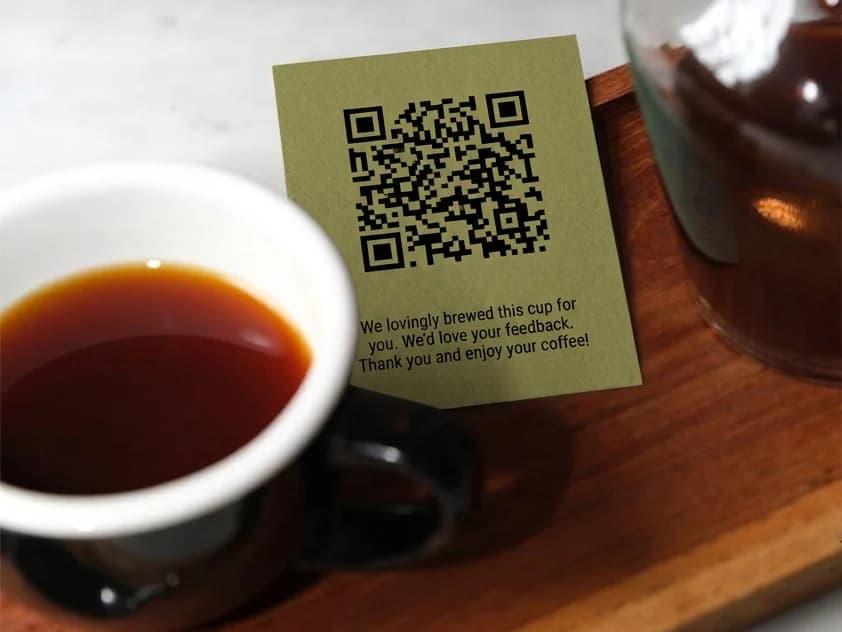
- Check-presenter insert — the highest-intent moment in the room: the guest is seated, phone in hand, experience complete. If you print only one format, print this one.
- Table sticker or small stand (NFC + QR) — always present, never pushy; guests scan at their own pace.
- Barista / waiter cards — handed personally, which doubles as the ask itself. Works beautifully with per-staff codes (see step 5).
- Counter card at the register — catches takeaway guests the table formats miss.
- Skip the wall poster as your primary format — it's visible to everyone and acted on by no one; nobody photographs a wall on the way out.
Print size matters more than style: the code needs to scan from a lazy 30–40 cm, one-handed, in dim evening light — that means at least 2×2 cm of clean code with real contrast, matte lamination (glare kills scans), and a five-word invitation next to it. “Enjoyed it? Tell people — 30 seconds” outperforms a bare code.
Step 4 — pair the code with a human ask
Here's the uncomfortable truth about review QRs: alone, they mostly decorate. The pattern that works is the pairing — the waiter says “if you have half a minute, the code on the card takes you right there,” and the code makes the promise true. Satisfied guests rarely review unprompted; disappointed ones need no prompt. Asking everyone, every service, is what rebalances your public record — and a short video of a familiar face on the landing page turns star-taps into the detailed sentences that both guests and AI assistants actually read.
Step 5 — measure, or you're guessing
Give each placement its own code — table stickers, check inserts, the counter card, each waiter's personal card — and watch scans per placement per week. Within a month you'll know things no consultant could tell you: that table 4's sticker outperforms the poster ten to one, that Thursday's shift asks and Sunday's doesn't, that the counter card carries the whole takeaway crowd. In Norly this arrives as a leaderboard and per-code analytics out of the box; however you do it, don't print codes you can't count.
The five mistakes we see most
- 01Linking to the Maps listing instead of the review dialog (two taps lost, half the guests with them).
- 02One shared code everywhere — no way to learn which placement earns its table space.
- 03Tiny codes on glossy paper in candlelight.
- 04Printing the code and skipping the ask — furniture, not funnel.
- 05Incentivizing reviews (“scan for a free dessert”) — platform policies prohibit it, and the FTC's fake-review rule made paid endorsements a genuinely expensive habit.
Frequently asked questions
Which link should a Google review QR code point to?
The “Ask for reviews” short link from your Google Business Profile — it opens the review dialog directly, stars ready to tap. Don't encode your Maps listing URL: that strands guests two taps from the review box, and every extra tap loses a share of them.
Is it against Google's rules to ask for reviews with a QR code?
No — asking is allowed, and Google provides the short link for exactly this. What's prohibited is paying for reviews, offering rewards, or selectively soliciting only the guests you expect to be positive — the FTC's fake-review rule makes paid endorsements a finable offense in the US. A private line for problems offered to every guest alongside the public buttons filters nobody, and is a different thing entirely.
Should the QR cover just Google, or every review platform?
Every platform. Guests have habits — TripAdvisor, Facebook, Booking — and AI assistants cross-check your presence across platforms. One QR opening a smart page with all your platforms beats a Google-only code.
Where does a review QR code work best in a restaurant?
At the natural pause: the check presenter first, then a table sticker or stand, personal staff cards, and a counter card for takeaway guests. Skip the wall poster as your primary format — visible to everyone, acted on by no one.
Do review QR codes actually work on their own?
Mostly no — alone they decorate. The combination works: a person asks, and the code makes it effortless. Satisfied guests rarely review unprompted; pairing the ask with the code is what moves the numbers.
Sources

Vladimir Pitenin
Founder & CEO, Norly
Building visibility tools for cafés and restaurants. Writes about reviews, maps and AI search — with sources.
Read next
How to make your restaurant visible to AI: a practical guide
Guests now ask ChatGPT and Google's AI where to eat. Six practical moves — data consistency, detailed reviews, earned media and more — that decide whether the answer includes you.
Inside Norly: how we engineer AI visibility for restaurants
A candid tour of how each Norly feature maps to the signals AI assistants read — steady detailed reviews on every platform, private negativity handling, and proof it's all actually happening.